 Glossium
Join the Waitlist
Glossium
Join the Waitlist
Coming SoonPublic beta for Mac
A browser that reads the web with you.
Calm Spaces for your tabs, and Gloss beside every page.
Mac first; more platforms to come, inshallah.

Bring your browsing over.
Bring your bookmarks and history from the browser you use now. The welcome sheet brings them over, and nothing is added until you confirm.
Bring Your Browsing Over
Choose what to bring from your other browser.
- Bookmarks
- History
Nothing is added until you confirm.
A Space for every part of your life.
Work, home and everything in between each get a Space of their own, with its own colour, Pinned sites and tabs. Only what belongs to what you’re doing is in front of you, and the rest waits where you left it.
Coming Soon A separate sign-in for each Space, so your work and personal email can stay open side by side.
Notes from the glassworks
Launch checklist
The long ferment
Try a colour.
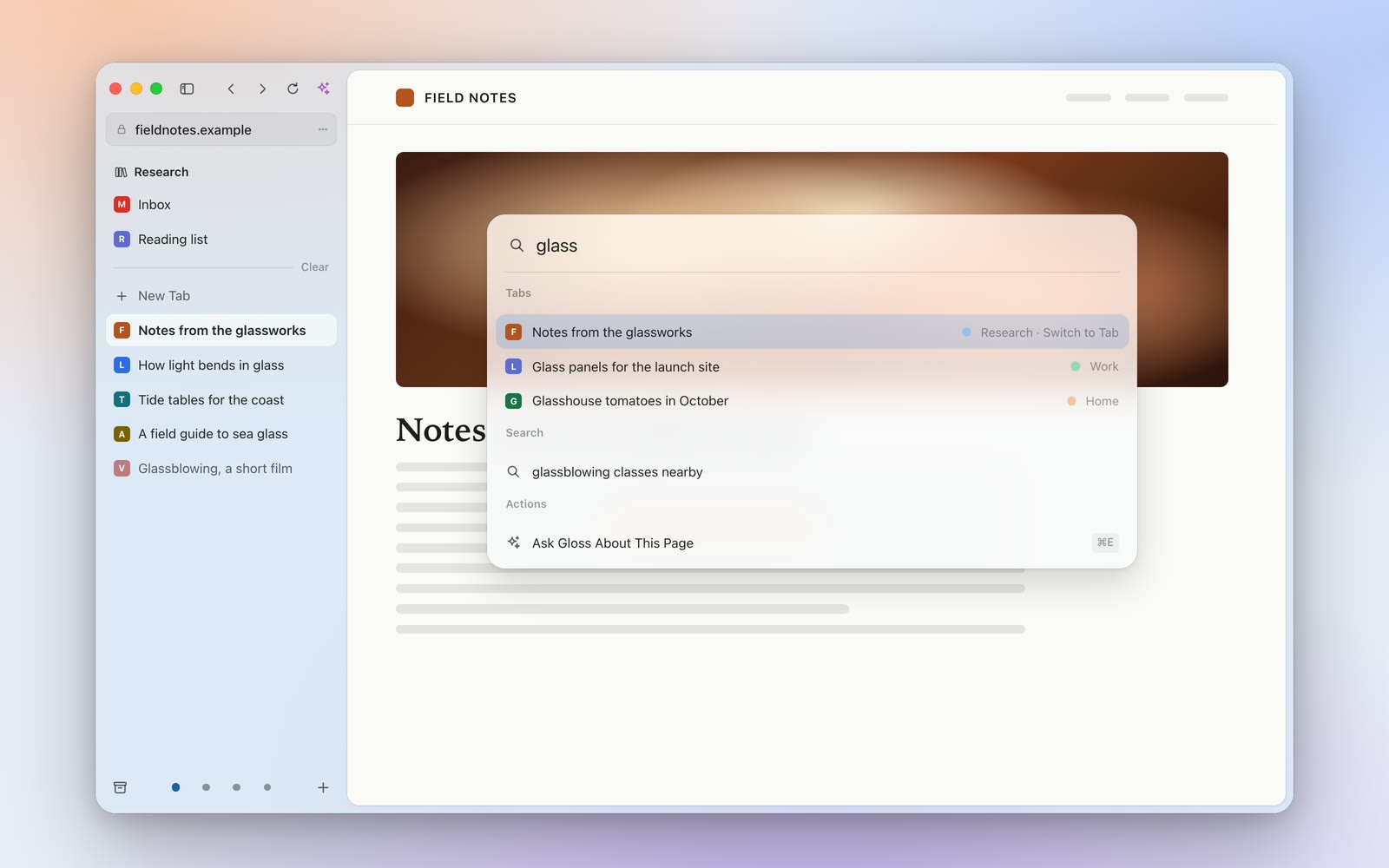
One bar for everything.
Every tab you have open, in any Space, Glossium’s own actions and the web are all in one place, so a few letters find what you need instead of a hunt through rows of tabs.
Links and Tabs
Peek at links.
Look at a link without losing your place or piling up tabs. Its page opens over the one you’re reading and goes away when you’re done, unless you decide to keep it.
Notes from the glassworks
Reading the tide
Two pages, one window.
Compare two pages, take notes beside an article or follow a guide while you work, with both in view instead of switching back and forth.
Notes from the glassworks
Reading the tide
Tabs tidy themselves.
Tabs you’ve stopped using move to the Archive after a day and stay there for 90 days, so the sidebar stays short and nothing is lost.
The gist before the click.
Before you open a link, you can know what’s behind it: the article’s picture, title and reading time, and a summary in a few lines when you want one, made on your Mac whenever it can be.
Reading the tide
Reading the tide
Summary
A calmer way to read.
Coming Soon A reading mode of Glossium’s own: any article in one clean column, with everything but the words set aside.
Reading the tide
Ask any page.
Gloss reads the page with you: a summary, the key points linked to the passages they come from, and answers to your questions. It uses your own Claude key and sends a page only when you ask.
Notes from the glassworks
Glass is shaped while it glows, then cooled slowly overnight so nothing inside it cracks. 1 2
Key Points
1
2
3
Hide everything but the page.
The sidebar slides away so the page has your full focus: no bookmarks, no address bar, nothing else. It’s good for demos too, when you share your screen.
And more on the way.
These are planned for Mac. None of them is in the beta, and the order may change.
Yours, on every Mac
- Coming Soon
Sync across your Macs
Pick up on any of your Macs. Sync is end-to-end encrypted.
- Coming Soon
Import profiles into Spaces
Bring each profile from the browser you use now straight into a Space of its own.
- Coming Soon
Spaces that share
Let Spaces share logins and bookmarks, when you want them to.
A window that gets out of the way
- Coming Soon
A borderless window
Nothing around the page but the window’s own corners.
- Coming Soon
Buttons that wait for you
The window buttons appear only when your pointer reaches them.
- Coming Soon
Pull the sidebar out
Drag the sidebar out from the side of the window, with your trackpad.
- Coming Soon
A soft loading light
A gentle light shows a page is on its way, even with the sidebar hidden.
- Coming Soon
Smooth, continuous corners
Every shape curves the way macOS draws it, with no hard turn at the corner.
Links, downloads and the address
- Coming Soon
Press to Peek
Force-press a link to Peek at it, then pinch to open it.
- Coming Soon
Downloads you can read
Files arrive with names a person would have typed, and Undo if you prefer the original.
- Coming Soon
Site controls in the address
Camera, microphone, sound and more, one click from the site’s address.
- Coming Soon
Glass Picture in Picture
A playing video floats in a window of glass that moves aside as your pointer passes.
Spaces and tidying
- Coming Soon
A lens that travels
In the Space switcher, a soft hover lens glides from one Space to the next.
- Coming Soon
Pull to Clear
Pull down on History or the Archive to clear a stretch of time, tab by tab or in bursts. Undo is always there.
- Coming Soon
The Tide Line
Pull the line up through your oldest tabs to archive exactly those.
Privacy, in brief.
- No account. Glossium doesn’t sign you in. You open it and start browsing.
- Your pages stay yours. Gloss sends a page’s text to the provider whose key you added, only when you ask. Apple’s on-device model sends nothing.
- One regular question. Every few hours Glossium asks its update server whether a newer version exists. Like any web request, it carries your IP address.
- Nothing about your pages. Crash reports carry no web addresses, page titles or page content, and nothing about how you use Glossium is sent unless you switch on anonymous usage counts.
Hear when the beta is ready.
A public beta for Apple silicon Macs on macOS 26 or later. Mac first; more platforms to come, inshallah.
Follow along.
Each new version will be listed in Releases, and Discussions is where questions and ideas go. Both are on GitHub.